Volshell - Crash Course
A crash course in Volshell

Preface
Volatility is an amazing tool for working with Memory Snapshots, and it contains a lot of plugins in its arsenal to achieve amazing results. But what happens when the plugins leave you wanting more, or you want to just explore the Windows and Linux structures interactively, dereference, cast, and read arbitrary memory locations?
Volshell is technically an (empty) plugin for Volatility, but it provides interactive functionality, meaning you can import and instantiate objects and use their methods all from the command line.
Disclaimer
I am by no means a Volatility expert; this post showcases a really small part of Volshell’s basics and functionality and has been derived from my day-to-day workflow in Research and Forensic content development. However, when I first began my journey in memory analysis with Volatility, I identified a real lack of documentation/example for the tools. This is a small effort to alleviate some of those hurdles and hopefully shine some light on Volshell.
Disclaimer II
For this post, I will be using a Windows memory snapshot. But the same exact primitives apply to a Linux snapshot as well. Save for some specific Windows components get_peb(), etc.
Invokation
Volshell is a Python Interactive shell with added Volatility magic that enables interactive access and scripting in a memory snapshot!
We invoke the interactive shell by running volshell instead of vol and specifying a memory snapshot as usual:
1
2
3
4
5
6
7
8
9
10
11
12
13
14
15
16
volshell -f snapshot.mem [-w|-l]

Code complete
Python 3.14.3 (main, Feb 18 2026, 14:35:05) [GCC 15.2.1 20260209]
Type 'copyright', 'credits' or 'license' for more information
IPython 9.9.0 -- An enhanced Interactive Python. Type '?' for help.


Call help() to see available functions

Volshell mode        : Windows
Current Layer        : layer_name
Current Symbol Table : symbol_table_name1
Current Kernel Name  : kernel

[layer_name]>
Make sure you have
iphytoninstalled! Volatility identifies this on startup, and as a result, you get a lot more goodies like highlighting, tab completion, etc.
1
2
3
4
5
6
7
8
9
10
11
12
13
14
15
16
17
18
19
20
21
22
23
24
25
26
27
28
29
30
31
32
33
34
35
36
37
38
[...]
try:
    from IPython import terminal
    from traitlets import config as traitlets_config

    has_ipython = True
except ImportError:
    has_ipython = False
[...]
        if has_ipython:

            class LayerNamePrompt(terminal.prompts.Prompts):
                def in_prompt_tokens(self, cli=None):
                    slf = self.shell.user_ns.get("self")
                    layer_name = slf.current_layer if slf else "no_layer"
                    return [(terminal.prompts.Token.Prompt, f"[{layer_name}]> ")]

            c = traitlets_config.Config()
            c.TerminalInteractiveShell.prompts_class = LayerNamePrompt
            c.InteractiveShellEmbed.banner2 = banner
            self.__console = terminal.embed.InteractiveShellEmbed(
                config=c, user_ns=combined_locals
            )
        else:
            self.__console = code.InteractiveConsole(locals=combined_locals)
        # Since we have to do work to add the option only once for all different modes of volshell, we can't
        # rely on the default having been set
        if self.config.get("script", None) is not None:
            self.run_script(location=self.config["script"])

            if self.config.get("script-only"):
                exit()

        if has_ipython:
            self.__console()
        else:
            self.__console.interact(banner=banner)
[...]
It is also recommended to add the -w or the -l switch. This immediately drops you into a Windows or Linux (respectively) specific shell. There are shell commands that exist only within the scope of the specific platform.
Configuration
Understanding the shell’s configuration is paramount for working within it! Plugin methods are run with a specific configuration, and in order to provide it to them, we first have to understand how to extract and interpret it. The current configuration can be displayed using print(self.config):
1
2
3
4
5
6
7
8
9
10
11
12
13
14
15
16
17
18
19
20
21
22
23
24
25
26
27
28
29
30
31
32
33
[layer_name]> print(self.config)
{
  "generic_volshell": false,
  "generic_volshell.generic_volshell": true,
  "generic_volshell.regex_scanner.regex_scanner": true,
  "kernel": "kernel",
  "kernel.class": "volatility3.framework.contexts.Module",
  "kernel.layer_name": "layer_name",
  "kernel.layer_name.class": "volatility3.framework.layers.intel.WindowsIntel32e",
  "kernel.layer_name.kernel_virtual_offset": 272712352137216,
  "kernel.layer_name.memory_layer": "memory_layer",
  "kernel.layer_name.memory_layer.base_layer": "base_layer",
  "kernel.layer_name.memory_layer.base_layer.class": "volatility3.framework.layers.physical.FileLayer",
  "kernel.layer_name.memory_layer.base_layer.location": "file:///home/canopus/dev/icc-bc/private/mem.elf",
  "kernel.layer_name.memory_layer.class": "volatility3.framework.layers.elf.Elf64Layer",
  "kernel.layer_name.memory_layer.isf_url": "file:///usr/lib/python3.14/site-packages/volatility3/framework/symbols/linux/elf.json",
  "kernel.layer_name.memory_layer.symbol_mask": 0,
  "kernel.layer_name.page_map_offset": 1761280,
  "kernel.layer_name.swap_layers": true,
  "kernel.layer_name.swap_layers.number_of_elements": 0,
  "kernel.offset": 272712352137216,
  "kernel.symbol_table_name": "symbol_table_name1",
  "kernel.symbol_table_name.class": "volatility3.framework.symbols.windows.WindowsKernelIntermedSymbols",
  "kernel.symbol_table_name.isf_url": "file:///usr/lib/python3.14/site-packages/volatility3/symbols/windows/ntkrnlmp.pdb/A1C414A488BC6DE9308B5D3D7579D109-1.json.xz",
  "kernel.symbol_table_name.symbol_mask": 0,
  "pid": null,
  "pslist": false,
  "pslist.pslist": true,
  "pslist.timeliner.timeliner": true,
  "regex_scanner": false,
  "regex_scanner.regex_scanner": true,
  "script-only": false
}
Accessing config elements using
.is a bad practice! Technically speaking, the.isCONFIG_SEPARATORand one should usepath_join()to join together config paths, rather thanself.kernel.layer_name.
Config Elements
Context
Imagine a big bucket that contains:
- Modules (i.e., the Kernel itself)
- Objects
- Methods to create and retrieve the above two
- Symbol Spaces
- and more
But most importantly, it contains the Layers!
Plugin methods use the context to pull specific elements needed for executions:
1
2
3
4
5
6
7
8
9
10
11
12
13
14
15
16
17
18
19
20
21
22
23
24
class PsList(interfaces.plugins.PluginInterface, timeliner.TimeLinerInterface):
    [...]

    @classmethod
    def list_processes(
        cls,
        context: interfaces.context.ContextInterface,
        kernel_module_name: str,
        filter_func: Callable[
            [interfaces.objects.ObjectInterface], bool
        ] = lambda _: False,
    ) -> Iterator["extensions.EPROCESS"]:
        """Lists all the processes in the given layer that are in the pid
        config option.

        Args:
            context: The context to retrieve required elements (layers, symbol tables) from
            layer_iname: The name of the layer on which to operate
            symbol_table_name: The name of the table containing the kernel symbols
            filter_func: A function which takes an EPROCESS object and returns True if the process should be ignored/filtered

        Returns:
            The list of EPROCESS objects from the `layer_name` layer's PsActiveProcessHead list after filtering
        """
The whole context can be retrieved using self.context.
Layers
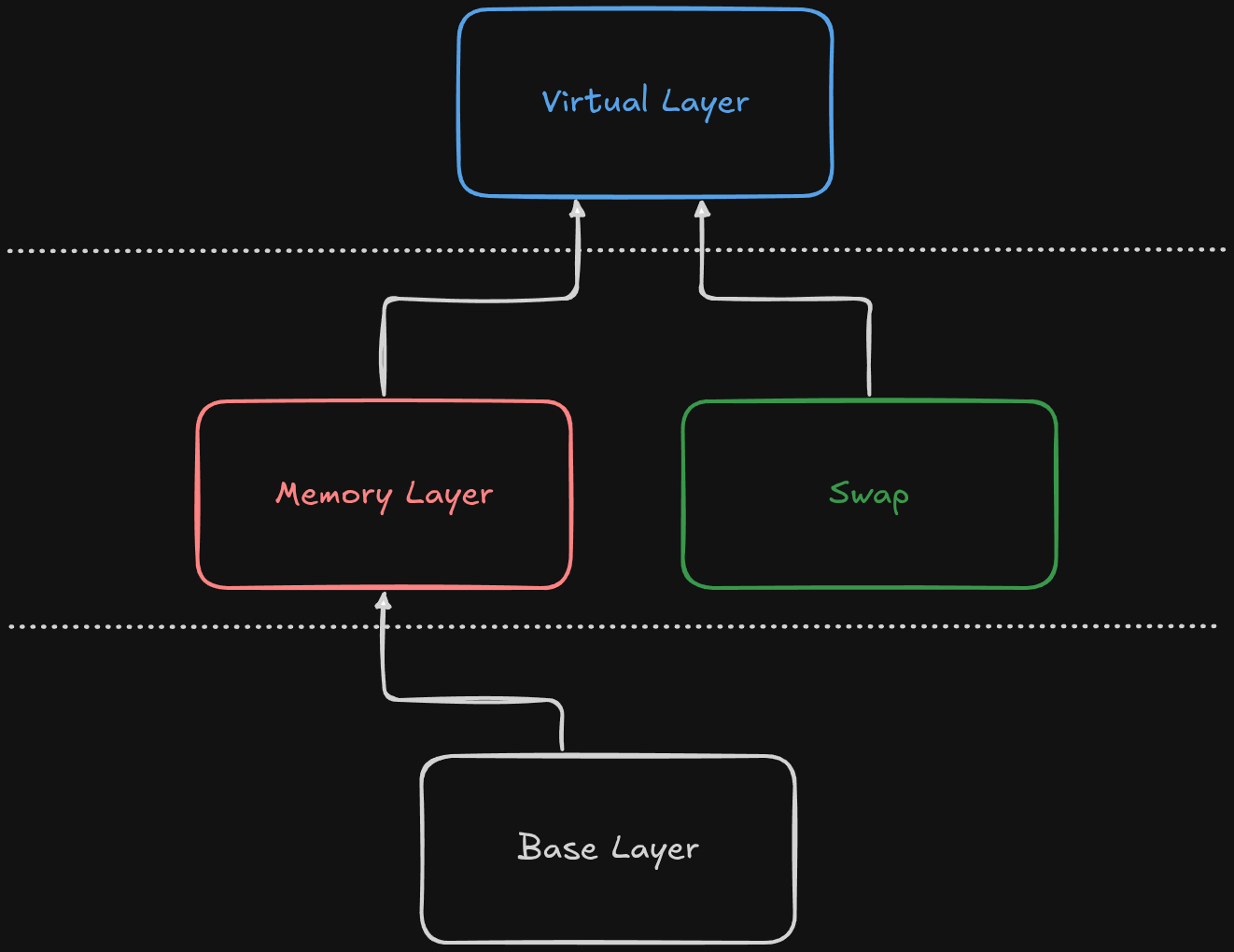
A layer is a specific container for each part of the memory hierarchy. They contain addresses, their data, and utilities to translate those addresses to other layers further down. Suppose you have a memory snapshot in an ELF format, and also a snapshot of the swap partition. This would be the Layer Hierarchy:
1
2
3
[layer_name]> print(list(self.context.layers))
['base_layer', 'memory_layer', 'layer_name']
[layer_name]>
Where the layers would be:
- Base Layer, of type
FileLayerand most of the time namedbase_layer:
1
2
[layer_name]> self.context.layers['base_layer']
Out[6]: <volatility3.framework.layers.physical.FileLayer at 0x7f472f103ed0>
- Memory Layer, most of the time named
memory_layer:
1
2
[layer_name]> self.context.layers['memory_layer']
Out[7]: <volatility3.framework.layers.crash.WindowsCrashDump64Layer at 0x7f472f102fd0>
The type of the memory layer, depends on acquisition method!
- Virtual Layer. There can be many different virtual layers inside a context, much like the virtual address spaces for each process! The first Virtual Layer is the Kernel’s Virtual Layer, named
layer_name, and its type is:
1
2
[layer_name]> self.context.layers['layer_name']
Out[8]: <volatility3.framework.layers.intel.WindowsIntel32e at 0x7f472f101950>
Most of these naming schemes (and the following) are just names, meaning layer_name could be kernel_layer just as much.
Since Layers are a hierarchy, each layer depends on the layer below, i.e., a Virtual Layer needs a physical layer to be constructed beforehand. We can list those dependencies using:
1
2
3
4
5
[layer_name]> kernel_layer
Out[224]: <volatility3.framework.layers.intel.WindowsIntel32e at 0x7f8a920a5810>

[layer_name]> kernel_layer.dependencies
Out[225]: ['memory_layer']
And by extension, we can get the layer below the virtual, which usually is the physical by indexing its dependency list at 0.
Layers are much more complex than I led on, and a crash course cannot do them justice, so I highly recommend reading:
- My Blog over on Hack The Box about creating Volatility ISFs; in which I go into detail on how layers work
- The Official Volatility documentation about Layers
Symbol Spaces
The Symbol Space interface exposes methods for a user to check and retrieve symbols/types. Suppose we want to retrieve the symbol ZwOpenFile, which corresponds to an exported function:
1
2
3
4
5
6
[layer_name]> hex(self.context.symbol_space.get_symbol(
    f"{self.config[configuration.path_join('kernel', 'symbol_table_name')]}!ZwOpenFile")
    .address
)
Out[34]: '0x6a63f0'
[layer_name]>
1
2
3
PS> dumpbin.exe /exports C:\Windows\System32\ntoskrnl.exe | Select-String 'ZwOpenFile'

    3045  BBF 006A63F0 ZwOpenFile
Again, the
!is technically aBANGand shouldn’t be hardcoded into scripts and configuration. A more proper way to write the above would be:
We can also examine and display types ad hoc:
1
2
3
4
5
6
7
8
9
10
11
12
13
14
[layer_name]> print(self.context.symbol_space.has_type("symbol_table_name1!_EPROCESS"))
True
[layer_name]> print(self.context.symbol_space.get_type("symbol_table_name1!_EPROCESS").size)
2112
[layer_name]> dt("symbol_table_name1!_EPROCESS")
symbol_table_name1!_EPROCESS (2112 bytes):
0x0 :   Pcb                                         symbol_table_name1!_KPROCESS
0x1c8 :   ProcessLock                                 symbol_table_name1!_EX_PUSH_LOCK
0x1d0 :   UniqueProcessId                             *symbol_table_name1!void
0x1d8 :   ActiveProcessLinks                          symbol_table_name1!_LIST_ENTRY
0x1e8 :   RundownProtect                              symbol_table_name1!_EX_RUNDOWN_REF
0x1f0 :   AccountingFolded                            symbol_table_name1!bitfield
0x1f0 :   AffinityPermanent                           symbol_table_name1!bitfield
[...]
The pslist plugin uses this exact logic to iterate over the processes and list them:
1
2
3
4
5
6
7
8
9
10
11
12
13
14
15
16
class PsList(interfaces.plugins.PluginInterface, timeliner.TimeLinerInterface):
    [...]

    @classmethod
    def list_processes(...)
        [...]
        kernel = context.modules[kernel_module_name]

        if not kernel.offset:
            raise ValueError(
                "Intel layer does not have an associated kernel virtual offset, failing"
            )

        ps_aph_offset = kernel.get_symbol("PsActiveProcessHead").address
        list_entry = kernel.object(object_type="_LIST_ENTRY", offset=ps_aph_offset)
    [...]
It first grabs the location of PsActiveProcessHead, and since that address points to the head of the list of processes, it constructs a _LIST_ENTRY object on that address (More on constructing an object later)
This concludes the 3 basic primitives of Volshell’s configuration. Before looking at the built-in Volshell commands, we should first examine 2 things:
- How can we call arbitrary methods from already built Plugins
- Re-Implementing the
list_processesin Volshell
With those 2 pieces of information, we can build our own code snippets that extend the functionality of the already existing plugins! Exactly what we did in CCSC2022 - Fakedoor Writeup
Calling Plugin Methods
Consider the PsList.list_processes method:
1
2
3
4
5
6
7
8
9
@classmethod
def list_processes(
    cls,
    context: interfaces.context.ContextInterface,
    kernel_module_name: str,
    filter_func: Callable[
        [interfaces.objects.ObjectInterface], bool
    ] = lambda _: False,
) -> Iterator["extensions.EPROCESS"]:
It yields an iterator over a list of _EPROCESSes. How can we call that interactively from Volshell?
The answer lies in the _generator method, that set’s up its arguments and then yields each line to the renderer:
1
2
3
4
5
6
7
def _generator(self):
    [...]
    for proc in self.list_processes(
        self.context,
        self.config["kernel"],
        filter_func=self.create_pid_filter(self.config.get("pid", None)),
    ):
self.config.get("pid", None)retrieves the value from the Plugin’s requirement
We just need to import the Class into scope, set up the arguments, and call the method as such:
1
2
3
4
5
6
7
8
9
10
11
12
13
14
15
16
[layer_name]> from volatility3.plugins.windows.pslist import PsList

[layer_name]> proc_gen = PsList.list_processes()
---------------------------------------------------------------------------
TypeError                                 Traceback (most recent call last)
Cell In[50], line 1
----> 1 proc_gen = PsList.list_processes()

TypeError: PsList.list_processes() missing 2 required positional arguments: 'context' and 'kernel_module_name'
[layer_name]> proc_gen = PsList.list_processes(self.context, self.config['kernel'])
[layer_name]> dt(proc_gen.__next__())
symbol_table_name1!_EPROCESS (2112 bytes) @ 0xd703c769d040:
0x0 :   Pcb                                         symbol_table_name1!_KPROCESS                                  offset: 0xd703c769d040
0x1c8 :   ProcessLock                                 symbol_table_name1!_EX_PUSH_LOCK                              offset: 0xd703c769d208
0x1d0 :   UniqueProcessId                             *symbol_table_name1!void                                      0x4 (unreadable pointer)
0x1d8 :   ActiveProcessLinks                          symbol_table_name1!_LIST_ENTRY                                offset: 0xd703c769d218
This is different than what is described in the documentation. We are not calling the windows.pslist.PsList plugin; we are importing an arbitrary Class, and we run methods from it!
Re-Implementing PsList.list_process
This will give us some more insight on what’s possible with Volshell including object creation, traversal, casting and displaying.
We begin by grabbing the kernel module:
1
2
3
[layer_name]> ntoskrnl = self.context.modules[self.config['kernel']]
[layer_name]> ntoskrnl
Out[58]: <volatility3.framework.contexts.Module at 0x7f8a929539d0>
As previously mentioned, the symbol address of PsActiveProcessHead is retrieved, and a _LIST_ENTRY object is constructed at that address:
1
2
3
4
5
6
7
8
[layer_name]> ps_aph_offset = kernel.get_symbol("PsActiveProcessHead").address
[layer_name]> list_entry = kernel.object(object_type="_LIST_ENTRY", offset=ps_aph_offset)
[layer_name]> list_entry
Out[61]: <LIST_ENTRY symbol_table_name1!_LIST_ENTRY: layer_name @ 0xf807cbd05880 #16>
[layer_name]> dt(list_entry)
symbol_table_name1!_LIST_ENTRY (16 bytes) @ 0xf807cbd05880:
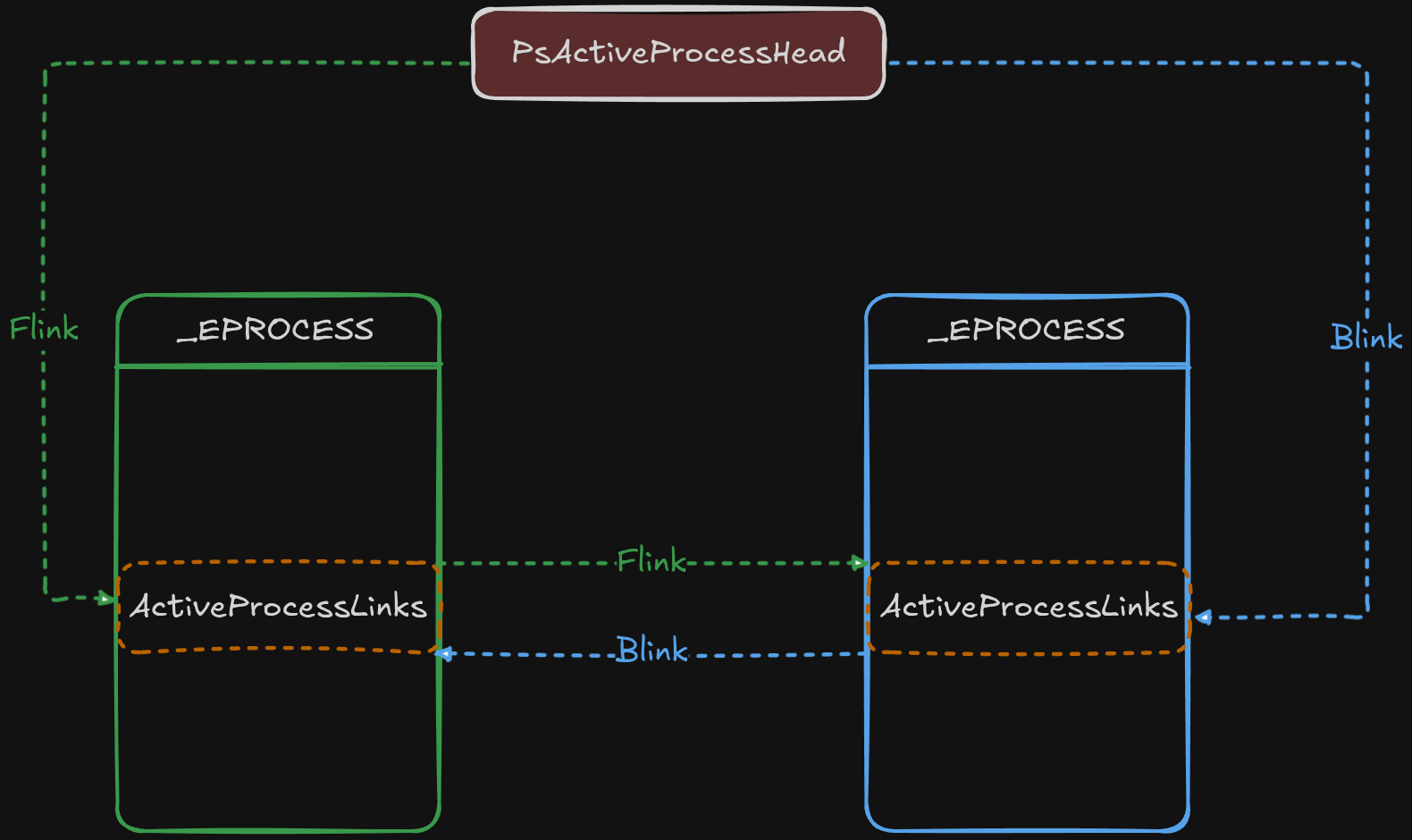
0x0 :   Flink     *symbol_table_name1!_LIST_ENTRY     0xd703c769d218
0x8 :   Blink     *symbol_table_name1!_LIST_ENTRY     0xd703d15ce258
One of _EPROCESS’ attributes is ActiveProcessLinks of type _LIST_ENTRY, which points to the next and previous _EPROCESS.ActiveProcessLinks:
We can grab any relative offset of an attribute by using relative_child_offset:
1
2
3
4
[layer_name]> reloff = kernel.get_type("_EPROCESS").relative_child_offset("ActiveProcessLinks")

[layer_name]> hex(reloff)
Out[96]: '0x1d8'
We can create objects in Volshell using either self.context.object or Module.object, the latter being a wrapper around the former.
We subtract the relative offset to reach the base location on which we place the newly created _EPROCESS object:
1
2
3
4
5
[layer_name]> eproc = kernel.object(
    object_type="_EPROCESS",
    offset=list_entry.vol.offset - reloff,
    absolute=True,
)
We can get the address of any constructed object using
vol.offset
A couple of noteworthy things to note here:
The difference between self.context.object() and Moule.object() is that in the former, we are free to specify the layer on which the object should be created; however, in the latter, the object is created on top of the same layer of the module it belongs to!
1
2
3
4
5
6
7
8
9
10
11
12
13
14
15
16
17
18
19
20
21
22
23
24
25
26
27
28
29
30
31
32
33
34
35
36
37
38
39
40
41
42
43
class Module(interfaces.context.ModuleInterface):
    [...]
    def object(
        self,
        object_type: str,
        offset: Optional[int] = None,
        native_layer_name: Optional[str] = None,
        absolute: bool = False,
        **kwargs,
    ) -> "interfaces.objects.ObjectInterface":
        """Returns an object created using the symbol_table_name and layer_name
        of the Module.

        Args:
            object_type: Name of the type/enumeration (within the module) to construct
            offset: The location of the object, ignored when symbol_type is SYMBOL
            native_layer_name: Name of the layer in which constructed objects are made (for pointers)
            absolute: whether the type's offset is absolute within memory or relative to the module
        """
        if constants.BANG not in object_type:
            object_type = self.symbol_table_name + constants.BANG + object_type
        elif not object_type.startswith(self.symbol_table_name + constants.BANG):
            raise ValueError(
                "Cannot reference another module when constructing an object"
            )

        if offset is None:
            raise TypeError("Offset must not be None for non-symbol objects")

        if not absolute:
            offset += self._offset

        # We have to allow using an alternative layer name due to pool scanners switching
        # to the memory layer for scanning samples prior to Windows 10.
        layer_name = kwargs.pop("layer_name", self._layer_name)

        return self._context.object(
            object_type=object_type,
            layer_name=layer_name,
            offset=offset,
            native_layer_name=native_layer_name or self._native_layer_name,
            **kwargs,
        )
The other is the notion of the absolute named argument in the .object methods:
1
2
3
4
5
6
7
8
9
10
[layer_name]> eproc = kernel.object(
    object_type="_EPROCESS",
    offset=list_entry.vol.offset - reloff,
    absolute=True,
)

[layer_name]> list_entry = kernel.object(
    object_type="_LIST_ENTRY",
    offset=ps_aph_offset
)
Because PsActiveProcessHead ‘lives’ in the Kernel module, we don’t need to specify an absolute offset in virtual memory. As shown above, if absolute is omitted, then creation takes place relatively to the module’s offset, rather than on an arbitrary location.
Next up is a really cool feature of Volatility, the ability to convert elements to a list, because they share a linked list argument:
1
2
3
4
5
6
7
8
9
10
11
[layer_name]> eproc_iter = eproc.ActiveProcessLinks.to_list(
         ...:     symbol_type=eproc.vol.type_name,
         ...:     member="ActiveProcessLinks",
         ...: )

[layer_name]> dt(eproc_iter.__next__())
symbol_table_name1!_EPROCESS (2112 bytes) @ 0xd703c769d040:
0x0 :   Pcb                                         symbol_table_name1!_KPROCESS                                  offset: 0xd703c769d040
0x1c8 :   ProcessLock                                 symbol_table_name1!_EX_PUSH_LOCK                              offset: 0xd703c769d208
0x1d0 :   UniqueProcessId                             *symbol_table_name1!void                                      0x4 (unreadable pointer)
0x1d8 :   ActiveProcessLinks                          symbol_table_name1!_LIST_ENTRY                                offset: 0xd703c769d218
This will return an iterator over a list of (type) eproc.vol.type_name and use the ActiveProcessLinks attribute of that type to reconstruct the chain:
1
2
[layer_name]> eproc.vol.type_name
Out[110]: 'symbol_table_name1!_EPROCESS'
Internally, it uses
self.context._objectto construct the object before yielding it
The code (pslist.py) also traverses the list in both directions, avoiding duplicates. This ensures that even a broken Flink/Blink due to memory corruption will not hinder the plugin’s abilities.
More Tricks
Now that we know about layers and objects, let’s see what we can do with them!
Grabbin an _EPROCESS object arbitrarily
We can retrieve an _EPROCESS object directly, using def get_process(self, pid=None, virtaddr=None, physaddr=None):
1
2
3
4
5
6
[layer_name]> eproc = gp(pid=5432)

[layer_name]> dt(eproc)
symbol_table_name1!_EPROCESS (2112 bytes) @ 0xd703cfb6c080:
0x0 :   Pcb                                         symbol_table_name1!_KPROCESS                                  offset: 0xd703cfb6c080
[...]
Adding Process Virtual Layer
We can create a new virtual layer for our process using the _EPROCESS.add_process_layer():
1
2
3
4
[layer_name]> proc_layer_name = eproc.add_process_layer()

[layer_name]> self.context.layers[proc_layer_name]
Out[134]: <volatility3.framework.layers.intel.WindowsIntel32e at 0x7f8a7d3db6f0>
Traversing Objects
We can easily traverse object attributes using . notation:
1
2
3
4
5
6
7
[layer_name]> dt(eproc.Pcb.ProfileListHead)
symbol_table_name1!_LIST_ENTRY (16 bytes) @ 0xd703cfb6c098:
0x0 :   Flink     *symbol_table_name1!_LIST_ENTRY     0xd703cfb6c098
0x8 :   Blink     *symbol_table_name1!_LIST_ENTRY     0xd703cfb6c098

[layer_name]> hex(eproc.Pcb.ProfileListHead.Flink)
Out[138]: '0xd703cfb6c098'
Dereferencing
We can easily dereference objects:
1
2
3
4
5
6
7
8
9
10
11
12
13
14
[layer_name]> flink_ptr = eproc.Pcb.ProfileListHead.Flink

[layer_name]> flink_ptr
Out[142]: 236411369734296

[layer_name]> flink = eproc.Pcb.ProfileListHead.Flink.dereference()

[layer_name]> dt(flink)
symbol_table_name1!_LIST_ENTRY (16 bytes) @ 0xd703cfb6c098:
0x0 :   Flink     *symbol_table_name1!_LIST_ENTRY     0xd703cfb6c098
0x8 :   Blink     *symbol_table_name1!_LIST_ENTRY     0xd703cfb6c098

[layer_name]> hex(flink_ptr)
Out[145]: '0xd703cfb6c098'
Casting
We can also cast objects into different types:
1
2
3
4
5
6
7
8
9
[layer_name]> kproc = eproc.cast("_KPROCESS")

[layer_name]> dt(kproc)
symbol_table_name1!_KPROCESS (456 bytes) @ 0xd703cfb6c080:
0x0 :   Header                                   symbol_table_name1!_DISPATCHER_HEADER                        offset: 0xd703cfb6c080
0x18 :   ProfileListHead                          symbol_table_name1!_LIST_ENTRY                               offset: 0xd703cfb6c098
0x28 :   DirectoryTableBase                       symbol_table_name1!unsigned long long                        120750080
0x30 :   ThreadListHead                           symbol_table_name1!_LIST_ENTRY                               offset: 0xd703cfb6c0b0
[...]
String casting
Not only that, but we can also create strings from character arrays:
1
2
3
4
5
6
7
[layer_name]> dt(eproc.ImageFileName)
symbol_table_name1!array (15 bytes): ['101', '120', '112', '108', '111', '114', '101', '114', '46', '101', '120', '101', '0', '0', '0']

[layer_name]> proc_name = eproc.ImageFileName.cast("string", max_length=eproc.ImageFileName.vol.count)

[layer_name]> proc_name
Out[153]: 'explorer.exe'
Directly reading from a layer
We can read data directly from a layer using layer.read():
1
2
3
4
5
[layer_name]> proc_layer.read(
    offset=eproc.ImageFileName.vol.offset,
    length=eproc.ImageFileName.vol.count
)
Out[162]: b'explorer.exe\x00\x00\x00'
This will attempt to read at most length bytes from the layer. If, for any reason, that fails, then the entire call will backtrace!
1
2
3
4
5
6
7
[layer_name]> proc_layer.read(offset=eproc.ImageFileName.vol.offset, length=0xffffffffffff)
---------------------------------------------------------------------------
PagedInvalidAddressException              Traceback (most recent call last)
Cell In[163], line 1
----> 1 proc_layer.read(offset=eproc.ImageFileName.vol.offset, length=0xffffffffffff)
[...]
PagedInvalidAddressException: Page Fault at entry 0xa89600000000 in page entry
We can avoid that by adding the pad=True argument to pad and reads to the requested length:
1
2
3
4
5
6
7
8
[layer_name]> chunk_length = 0xffff
[layer_name]> chunk = proc_layer.read(offset=eproc.ImageFileName.vol.offset, length=chunk_length)
---------------------------------------------------------------------------
PagedInvalidAddressException              Traceback (most recent call last)
[...]
[layer_name]> chunk = proc_layer.read(offset=eproc.ImageFileName.vol.offset, length=chunk_length, pad=True)
[layer_name]> len(chunk) == chunk_length
Out[172]: True
Volatility will handle all the layer translations under the hood and will end up reading from the File Layer
Translating Addresses
If we want to translate an address to the Layer below (physical, base), we can use layer.translate().
1
2
[layer_name]> kernel_layer.translate(0xd703cfb6c080)
Out[174]: (3088613504, 'memory_layer')
This will return the Layer below, and the address in that layer!
The PEB (Process Environment Block)
Because the PEB exists in the User Space of the process, we cannot just do dt(eproc.Peb). When we have an _EPROCESS object, we can use the get_peb() method to return the object:
1
2
3
4
5
6
7
8
[layer_name]> dt(eproc.get_peb())
symbol_table_name1!_PEB (2000 bytes) @ 0x36a000:
0x0 :   InheritedAddressSpace                    symbol_table_name1!unsigned char                     0
0x1 :   ReadImageFileExecOptions                 symbol_table_name1!unsigned char                     0
0x2 :   BeingDebugged                            symbol_table_name1!unsigned char                     0
0x3 :   BitField                                 symbol_table_name1!unsigned char                     4
0x3 :   ImageUsesLargePages                      symbol_table_name1!bitfield                          offset: 0x36a003 (unreadable)
[...]
get_peb()just adds a new process virtual layer usingadd_process_layer()and creates the_PEBobject on top of that layer:
These methods (
get_peb(),add_process_layer()) on Windows Objects are described involatility3/framework/symbols/windows/extensions/__init__.py
Bitfields
Volatility displays a bit field (Flags) in an Object as __unnamed_xxxx, notice all exist on the same address:
1
2
3
4
5
6
[layer_name]> dt(eproc.SyscallUsageValues)
symbol_table_name1!__unnamed_1c53 (4 bytes) @ 0xd703cfb6c860:
0x0 :   SysDbgGetLiveKernelDump               symbol_table_name1!bitfield     offset: 0xd703cfb6c860
0x0 :   SysDbgGetTriageDump                   symbol_table_name1!bitfield     offset: 0xd703cfb6c860
0x0 :   SyscallUsageValuesSpare               symbol_table_name1!bitfield     offset: 0xd703cfb6c860
0x0 :   SystemBigPoolInformation              symbol_table_name1!bitfield     offset: 0xd703cfb6c860
And we can check each field independently:
1
2
[layer_name]> eproc.SyscallUsageValues.SysDbgGetLiveKernelDump
Out[195]: 0
Built-in Volshell commands
There are a couple of built-in volshell commands that I find really helpful.
Changing Layer
The built-in Volshell commands work on top of the current layer:
[layer_name]> means we are currently using the Kernel’s Virtual Layer. We can change our current layer using the cl/change_layer() command. The input is a string, not a layer object!
1
2
[layer_name]> cl(proc_layer_name)
[layer_name_Process5432]>
Display {Byte/Word/Double Word/Quad Word}
We can use db/dd/dw/dq commands to instantly display a hex dump from a given address:
1
2
3
4
5
6
7
8
9
[layer_name_Process5432]> dq(0xd703cfb6c080)
0xd703cfb6c080    0000000000000003 ffffd703cfa86d20    ........ ......m.
0xd703cfb6c090    ffffd703d05a1f80 ffffd703cfb6c098    .....Z.. ........
0xd703cfb6c0a0    ffffd703cfb6c098 0000000007328000    ........ .....2..
0xd703cfb6c0b0    ffffd703cfb9a378 ffffd703ce331378    .......x .....3.x
0xd703cfb6c0c0    0000000000000000 0000000000000000    ........ ........
0xd703cfb6c0d0    ffffd703cfb6caf0 ffffd703cfb6cd60    ........ .......`
0xd703cfb6c0e0    0000000000000001 ffffd703cfb6c0e8    ........ ........
0xd703cfb6c0f0    ffffd703cfb6c0e8 0000000000000000    ........ ........
The default size dump is count=128. We can also change the layer to operate on, and also the byteorder:
1
def display_quadwords(self, offset, count=DEFAULT_NUM_DISPLAY_BYTES, layer_name=None, byteorder="@")
Dissassembly
If we have the address of a function, we can disassemble using dis():
1
2
3
4
5
6
7
8
9
10
11
12
13
14
15
[layer_name]> ntoskrnl = self.context.modules[self.config['kernel']]
[layer_name]> ZwOpenFile = ntoskrnl.get_symbol("ZwOpenFile").address
[layer_name]> dis(ntoskrnl.offset + ZwOpenFile)
0xf807cb4a63f0: mov     rax, rsp
0xf807cb4a63f3: cli
0xf807cb4a63f4: sub     rsp, 0x10
0xf807cb4a63f8: push    rax
0xf807cb4a63f9: pushfq
0xf807cb4a63fa: push    0x10
0xf807cb4a63fc: lea     rax, [rip + 0x5cfd]
0xf807cb4a6403: push    rax
0xf807cb4a6404: mov     eax, 0x33
0xf807cb4a6409: jmp     0xf807cb4bd6c0
0xf807cb4a640e: ret
[...]
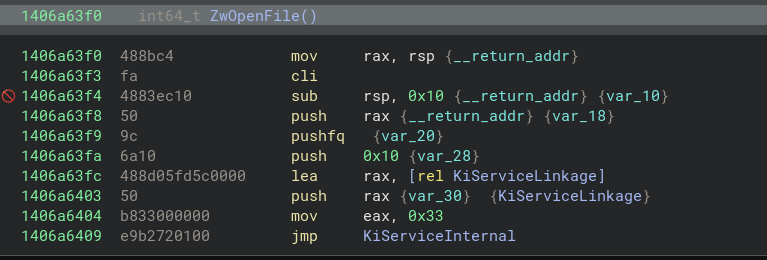 Disassembly of
 ntoskrnl.exe!ZwOpenFile
Running scripts
We can run scripts directly from the CLI using run_script/rs() or by specifying --script in the command arguments:
1
2
3
4
5
6
7
8
9
10
11
12
13
14
15
16
17
18
19
20
21
22
23
24
25
26
27
28
29
from volatility3.plugins.windows import pslist

ntoskrnl = self.context.modules[self.config["kernel"]]

ps_aph_offset = ntoskrnl.get_symbol("PsActiveProcessHead").address
list_entry = ntoskrnl.object(object_type="_LIST_ENTRY", offset=ps_aph_offset)

reloff = ntoskrnl.get_type("_EPROCESS").relative_child_offset("ActiveProcessLinks")

eproc = ntoskrnl.object(
    object_type="_EPROCESS",
    offset=list_entry.vol.offset - reloff,
    absolute=True,
)

seen = set()
for forward in (True, False):
    for eproc in eproc.ActiveProcessLinks.to_list(
        symbol_type=eproc.vol.type_name,
        member="ActiveProcessLinks",
        forward=forward,
    ):
        if eproc.vol.offset in seen:
            continue
        seen.add(eproc.vol.offset)
        proc_name = eproc.ImageFileName.cast(
            "string", max_length=eproc.ImageFileName.vol.count
        )
        print(f"[>] Found proc with name: {proc_name}")
1
2
3
4
5
6
7
8
9
10
[layer_name]> rs("./poc.py")
Running code from file:./poc.py

[>] Found proc with name: System
[>] Found proc with name: Registry
[>] Found proc with name: smss.exe
[>] Found proc with name: csrss.exe
[>] Found proc with name: wininit.exe
[>] Found proc with name: csrss.exe
[...]
Recapping
- We learned about the basic runtime variables:
- Context
- Layers
- Symbols
- How can we call arbitrary methods from Plugins using these variables
- How to instantiate objects on arbitrary memory locations
- How to traverse them and access their fields
- Manipulate them
- Casting
- Dereferencing
- Creating Lists
- Showcased some core Volshell commands
Closing
Thank you for reading this far, and I hope it has been informative. Here’s a potato: 🥔🥔